Protect your SSH keys on your Macbook with Secretive
Table of Contents
Secretive is an application on MacOS to safely store SSH keys inside the Secure Enclave. With the latest wave of supply chain attack injecting infostealers into people’s machine, I’m making the effort to safeguard my SSH keys.
The Secure Enclave
- is a Hardware Security Module (HSM): a separate execution environment (i.e. a mini computer) on the computer that contains an isolated, verified & trusted set of cryptographic operation.
- is used to back the Apple Password service and storing various system keys
- is available on most Apple computing device (since iPhone 5, MacBook 2016,)
A key feature of the Secure Enclave is that there’s no way to extract the key material out.
- The machine communicate with the HSM only through a very narrow interface for creating private keys, signing data, etc.
- On the Macbook, the operation can also be further protected by demanding a Touch ID authentication
By default, the Secure Enclave on MacOS only supports the following encryption protocols:
- ECDSA-256
- MLDSA-65 and MLDSA-87: Post-quantum safe encryption format, requires MacOS Tahoe
Secretive App
Also support interfacing with smart cards (like YubiKey). This will allows managing other keys in other protocol such as RSA.
- Some services doesn’t allow ECDSA keys (Azure DevOps for example). In this case you will need a smart-card if you want to use Secretive
Security Model of Secretive: Secretive is Open source and can be openly audited. It’s Security Policy as of Apr 2026 states that:
- It’s not conceivable that Secretive can leak secret keys, as they relied on the HSM to manage them.
- Secretive doesn’t have external runtime dependency to rule out supply chain attack.
As far as open-source security is concerned, Secretive can be considered trustworthy
Operation with Secretive
Installing
The simplest way to install Secretive is through Homebrew: brew install secretive
If you want to manually verify the integrity of the executable, download the zip file from
Secretive GitHub Release Page, then run sha256sum to verify it
# Grab the hash from the GitHub release page. Below is the hash for version 3.0.4
export SECRETIVE_HASH="696d07812e4431075234a900a0136dbad3131a91086e535fc2b07d69a1d084ba"
sha256sum -c <(echo "$SECRETIVE_HASH Secretive.zip")
Secretive.zip: OK
If this doesn’t seems safe enough for you, then you can download the source code, audit it yourself and build it. You can’t never too prudent when it comes to security critical application.
Generate a secret key
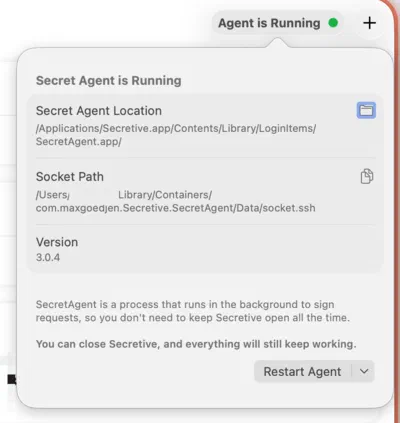
You need to enable the SSH Agent upon jumping into the app
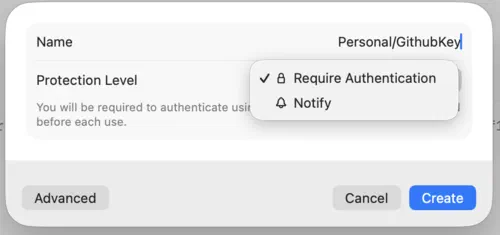
Then we create a SSH key. You can choose to Require Authentication for this key, which means everytime the keys is used your fingerprint is requested; or choose to just Notify, which sends you a notification.
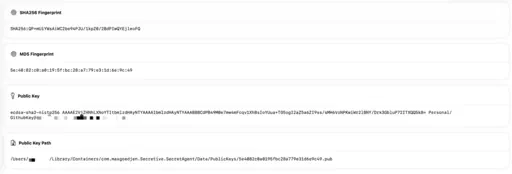
All the information you can see of a key are public information. I can even safely share it online, the only redactions here are my name and machine name.
Use the secret key
- You first need to configure the SSH Agent. There is two way to go about it:
- Set the environment variable:
export SSH_AUTH_SOCK=/Users/***/Library/Containers/com.maxgoedjen.Secretive.SecretAgent/Data/socket.ssh - Define in
~/.ssh/configitself:
- Set the environment variable:
Host *
    IdentityAgent /Users/***/Library/Containers/com.maxgoedjen.Secretive.SecretAgent/Data/socket.ssh

# this way you can override the IdentityAgent for other Host should it needed be

Host some.different.host.example.com
    IdentityAgent /custom/agent/socket.ssh
- Send your public key into your server
authorized_keysor your Git provider
After this, if you only have a few (less than 5) keys in Secretive, using ssh would work nicely:
The way to safely and conveniently use your keys is to add their references in your ~/.ssh/config file:
Host github.com
  HostName github.com
  User git
  IdentityFile ~/Library/Containers/com.maxgoedjen.Secretive.SecretAgent/Data/PublicKeys/5e4082c0a0195fbc28a779e31d6e9c49.pub
Analysis of attack vector & trade-off
Secretive is here to solve a specific problem: ensuring no SSH keys leaks. The private keys stays in the Secret Enclave and is (currently) impossible to extract. Therefore, even if you accidentally got infected with an infostealer, your keys are still safe.
However, this is also one of its drawback: you cannot backup a private key. If you lose access to your machine, your keys are gone too. Personally though, I see this as an expected outcome, because when I lose access to my machine I should also be rotating my credential anyway.
Another attack vector is through SSH Agent forwarding. I use this feature extensively to allow me doing Git fetch on my personal remote server. However, be absolutely sure that you don’t forward the SSH Agent to any untrusted server, because in that case the server can request your SSH key to sign a request and pull your data. 💭 💭 There exists another defense layer, which is the biometric or notification feature of Secretive. You will probably know it if a command requests to use your key
Conclusion
Security is a trade-off.
As with any other solution to protect your credentials, you are trading conveniences (backup ability, RSA compatibility, …) for more protection against extraction. Secretive isn’t a one-size-fit-all solution for SSH key management, but if you can, do try it because it does come pretty close to that mark.