Angular First Impressions
Table of Contents
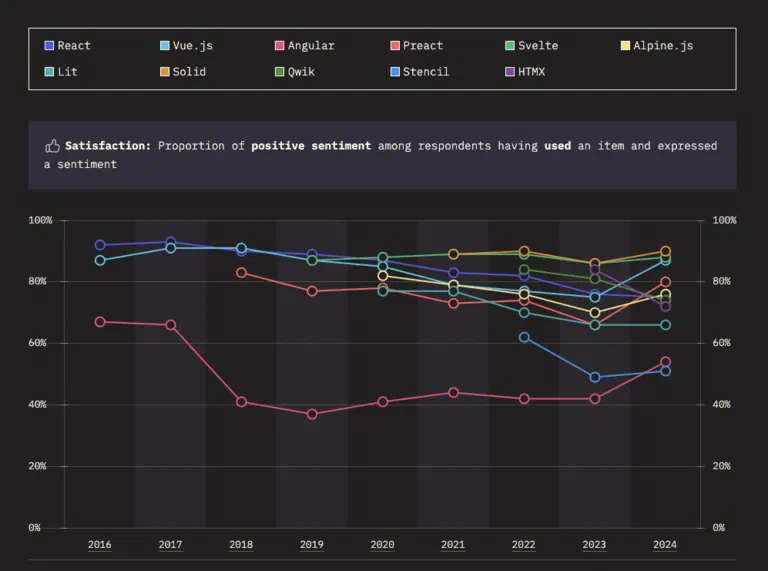
Angular is (still) the second/third most popular JS frontend framework 1 1 State of JavaScript 2024 survey . People would argue that it is due to the large amount of legacy codebase, and projects tends not to pick Angular.
I have always been reluctant to try Angular. Partly because of its messy relation with Angular.js. Most people don’t know that they are almost two different library/framework, not just two major versions 💭 💭 Don’t make the mistake of knowing Angular but take on an Angular.js job, it’s almost nothing alike . But at this current job, it has finally fallen upon me to work on an Angular project. This article will details my thoughts about this framework .
The Good
Dependency Injection
Dependency injection just solve soooooo many code structure & state management problems comparing to the approach taken by the other platform. It handles code-sharing, state scoping with a single simple mental model 💭 💭 Not that DI is a simple concept, but once you understand DI it just is simple to reason about . In this first Angular project, I was asking the guy who transferred the project to me: “So we are using anything like Redux/Pinia to manage states?”. He went “nope, just good olde Injectable”, and I suddenly realized of “oh yeah, that works!”. It just makes so much sense. Why do we need anything else?
Angular DI framework ties the injection context to the DOM tree, which means injection at one component will look up the provider on traversing upward the DOM tree. Want your state & logic to be scoped in a single component only? Provide it at the closest NgModule level; or if you are using standalone-components
💭
💭
You should, by now. Transitioning can actually be automated, and you are able to keep both types of component in a project.
, provide it at that component.
Want it to be globally available? Just use providedIn: root.
With DI, you solved the props drilling problem, but with better developer ergonomics comparing to React Context. Take a very contrived simple React context:
// context.tsx

// for better type safety, you gotta define the shape of the context too
type ContextAType = { someState: string, someMethods: () => void }
export const ContextA = createContext<ContextAType>({someState: "", someMethods: () => {}});

export const ContextAProvider: React.FC = ({children}) => {
    const someState = useState("foo");
    const someMethods = useCallback(() => {
        //...
    }, [])
    return <ContextA.Provider value={{someState, someMethods}}>{children}</ContextA.Provider>;
}

// Some where above Component, you gotta provide this context in, for example root or any routes in between, etc

const App = () => {
    return (
        <ContextAProvider>
            ...
        </ContextAProvider>
    )
}

// component.tsx
const Component: React.FC = ({children}) => {
    const a = useContext();
}
That’s like 3 or 4 things you gotta setup when creating a new Context Things that’s just unwieldy with React Context:
- You have to define default value
- Order of nesting is important. If ContextB needs something from ContextA, you have to nest B’s provider under A’s provider
- You have to provide the context above the component.
Now look at Angular’s Injectable. Spoiler alert: it is like 10 times less complicated comparing to React Context
// app.service.ts
@Injectable() // I'm not adding providedIn: 'root' here because we are providing it right where it's needed
class AppService {
    someState: string = "foo";
    someMethods() {
        // ...
    }
}

// app.component.ts
@Component({
    providers: [AppService]
})
class AppComponent {
    appService = inject(AppService);
}
I do hear you yelling at the back “What about Vue’s inject”. Well, I’d say Vue’s provide/inject is definitely less verbose than Context, but in essence those two solution are designed just to trickle value down from the root of the component tree. It’s not a full fledged Dependency Injection system, because you cannot inject another Injectable into an Injectable. In other word, your dependency cannot declaratively ask for another dependency [^2]. With Angular, however, this is a Tuesday
@Injectable({
    providedIn: 'root'
})
class GlobalService {
    globalState: string = "foo";
}

@Injectable() // Should also be injected somewhere
class AppService {
    globalService = inject(GlobalService)
}
With Dependency Injection, you can just bundle the states and related logic into one injectable, then compose your component & logics together in a modular way. Keeps it simple and there would be emergence pattern. No need for over engineering.
Signal
I think Signal is the definitive model for reactive state management. This is not a novel concept, you may know it by it many epithet in other frameworks, such as: Vue’s ref, Svelte’s rune. Sounds familiar? It is. At the center of Signal, we have three concepts:
- State: a writable object that you can control
- Derived state: a read-only object that automatically calculates its value based on other state. Think React’s
useMemo - Effect: an action performed when its dependent states changed
Signal is arguably more ergonomic, and way faster, comparing to hook-based states like React, due to its ability to figure out the relationship between states. While useEffect/useMemo requires you to define the dependency explicitly in an array
2
2
React Compiler is an attempt to do away with explicit definition of dependencies using static analysis. Before this, we already have ESLint rules to tell us when we miss a dependency.
, signal just calculate this automatically at runtime. But it doesn’t stop there. Signal is a finer-grained approach to pushing out reactive changes comparing to hooks, because by design signal only recalculate/perform effect when its dependencies push out a change notification. For example:
// This is Angular's signal implementation, but you will also see this behavior in other implementations as well.
const count = signal(1);
const doubleCount = computed(() => {
    // Don't actually put side-effect in computed when you write production code
    console.log("it's recalculating doubleCount");
    return count * 2;
});

count.set(2);
console.log(doubleCount()) // Some implementation may delay computed evalutation until it is called, so I'm just doing this to flush out the whole graph
// console.log: it's recalculating doubleCount
count.set(3);
console.log(doubleCount())
// console.log: it's recalculating doubleCount
While in React, useMemo (and useEffect and all the likes) has to check if the dependency array has changed, every re-render cycle. The equality evaluation has to be brief -> so they always just check for shallow equality or referential equality (same memory block). You need to ensure your whole chain of states are all called through hooks, so it retains the same reference across render calls if nothing has changed.
// If you do this, your useMemo is going to recalculate every single rerender cycle

function Component() {
    const someObject = {a: 1};
    const aDouble = useMemo(() => someObject.a * 2, [someObject]);
}
Contrived? I think not. The code above still kind of works, it just incurs a hidden performance hit on your rerender loop. Meanwhile, this class of bug will not update a computed signal in Angular, or, you cannot mix plain-old class state into signal.
@Component({
...
})
class SomeComponent {
    someObject = {a: 1}
    aDouble = computed(() => this.someObject.a * 2); // no signal chain established, so this signal won't work straight out of the box.
}
In short, Signal encourages better designed state, potentially improve the reactive rendering performance 3 3 At the moment Signal doesn’t yet yield any noticeable performance improvement over normal state. I also discuss about this in the Change Detection section. . Also in general, your code with signal looks reactive but much simpler comparing to old Angular approach. That’s a big win in my book in keeping Angular accessible for newbies.
Binding
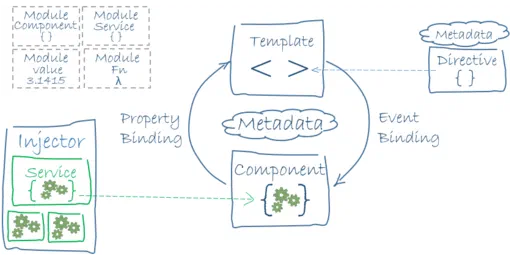
Another thing that is so polished with Angular (probably only rivaled by Vue) is the extensive binding capability. You have:
- Event binding with modifiers (with caveats 4 4 Event binding modifier is limited to keyboard modifier only though )
- Deep properties binding: bind directly to a property or subproperty like
style.backgroundColoror declaratively add a class with a boolean<div [style.backgroundColor]="backgroundColor " [class.activated]="isActivated" > </div> - Binding from inside the class: you can define binding on the
:hostelement 5 5 In Angular, a Component is rendered as an actual DOM element, using Web Components usingHostBinding. This is similar to putting binding on Vue’s top<template>tag
Those capabilities are available because like Vue, Angular started with standard compliancy in mind. All the features are an extension of what is already Web standard, sprinkled with some reactivity.
The Bad
We are getting to the ranting part. Here are some frustrating things I experienced while getting used to Angular.
Angular Material
When I first started with React back in the 2016, I was told to use Material UI (then version 3) for learning frontend development. It was certainly a very pleasant development experience, with detailed documentation, examples for components, APIs, how to theme it, how to customize it should the need arises. It can be said that Material Design is the most popular design system, and MUI is one of the most succesful component libraries in the world. I walked into Angular Material with GREAT EXPECTATIONS, because:
- Angular is developed by Google
- Material Design is developed by Google
- Angular Material is developed by the Angular team
- It can be expected that Google would put in some reasonable effort for the flagship UI library of their flagship design system, on their flagship web framework.
And you know what they say, the more you expect the more you will be disappointed. Because DevX for Angular Material is, putting mildly: disappointing.
- The docs are poorly written. Not every components & configuration has a document entry, let alone an example.
- Styling & theming exists in a limbo between Material Design v2 and v3, but the distinction is not documented clearly.
- Also, no search box on their documentation page. It is extremely frustrating and time consuming searching for guidance on a component/configuration.
Note to self: next time you start an Angular project, use PrimeNG or Taiga
Hot module reloading
I guess this is a case of being spoiled rotten by how React/Vue with Vite just works. With other frameworks, Vite will reload only the part of code that you touch. If you change your stylesheet, your application states stay the same. If you change the code of one component, anything above & out of that component’s subtree is untouched. Tools like Vite feels really like magic — but only if the framework integrate it correctly. Vite frameworks’ plugins are responsible for maintaining the codebase module graph & will decide which module to mark as dirty to be reloaded, whenever your code changes.
Angular HMR feels rough. Almost all the changes I do is slow to update on the frontend on a sufficiently large codebase. And then the biggest issue is, the module reload is not very localized. This means sometimes the whole pages refresh. Sometimes a big chunk of states get reset & you have to perform the whole flow again, even when you change just a single line in the template.
API state management
Not truly a bad, maybe because I’m really spoiled with how easy it is to manage API calls with Tanstack Query in React & Vue. In the past there has been multiple attempts to address this:
- The original way of using
HttpClientwhich returns an Observable, which can be piped through anAsyncPipe - The newer better way using both Observable & Signal
- The experimental
resourceAPI
The problem with Angular 20’s state management is that it is sitting in the middle of a crossroad, between Observable & Signal. And for most of the tutorial, they can really seems to decide what to endorse. HTTP calls are still recommended to be made using HttpClient, returning an Observable, which fits the Signal like a
%% Todo: write this section some more %%
Afterthoughts
Every technology has its strenghts, but also warts and thorns. Angular sits in a weird space of being very well engineered, but suffered from small mindshare & waning community. The accompanying products such as UI, state management libraries around Angular seems very inactive, dated & overall not very exciting to pickup. Still, if we can accept the lack of bell & whistle of Angular, we can certainly appreciate its well thought out tools for building enterprise applications.